
使用离线引擎查询 VLM#
本教程演示如何使用 SGLang 的离线引擎 API (offline Engine API) 来查询 VLM。我们将以 Qwen2.5-VL 和 Llama 4 为例进行演示。本节将展示三种不同的调用方法:
基础调用:直接传递图像和文本。
处理器输出:使用 HuggingFace 处理器进行数据预处理。
预计算嵌入:预先计算图像特征以提高推理效率。
理解三种输入格式#
SGLang 支持三种传递视觉数据的方式,每种方式都针对不同的场景进行了优化:
1. 原始图像 (Raw Images) - 最简单的方法#
直接传递 PIL 图像、文件路径、URL 或 base64 字符串
SGLang 会自动处理所有预处理工作
最适用于:快速原型设计、简单的应用程序
2. 处理器输出 (Processor Output) - 用于自定义预处理#
使用 HuggingFace 处理器预处理图像
传递完整的处理器输出字典,并带上
format: "processor_output"最适用于:自定义图像转换、与现有工作流集成
要求:必须使用
input_ids而非文本提示词 (text prompt)
3. 预计算嵌入 (Precomputed Embeddings) - 追求极致性能#
使用视觉编码器 (vision encoder) 预先计算视觉嵌入
传递嵌入向量,并带上
format: "precomputed_embedding"最适用于:对相同图像进行重复查询、缓存、高吞吐量服务
性能提升:避免冗余的视觉编码器计算(提速 30-50%)
核心规则:在单个请求中,所有图像必须使用同一种格式。请勿混用格式。
以下示例演示了在 Qwen2.5-VL 和 Llama 4 模型上使用这三种方法的过程。
查询 Qwen2.5-VL 模型#
[1]:
import nest_asyncio

nest_asyncio.apply()

model_path = "Qwen/Qwen2.5-VL-3B-Instruct"
chat_template = "qwen2-vl"
[2]:
from io import BytesIO
import requests
from PIL import Image

from sglang.srt.parser.conversation import chat_templates

image = Image.open(
    BytesIO(
        requests.get(
            "https://github.com/sgl-project/sglang/blob/main/examples/assets/example_image.png?raw=true"
        ).content
    )
)

conv = chat_templates[chat_template].copy()
conv.append_message(conv.roles[0], f"What's shown here: {conv.image_token}?")
conv.append_message(conv.roles[1], "")
conv.image_data = [image]

print("Generated prompt text:")
print(conv.get_prompt())
print(f"\nImage size: {image.size}")
image
Generated prompt text:
<|im_start|>system
You are a helpful assistant.<|im_end|>
<|im_start|>user
What's shown here: <|vision_start|><|image_pad|><|vision_end|>?<|im_end|>
<|im_start|>assistant


Image size: (570, 380)
[2]:
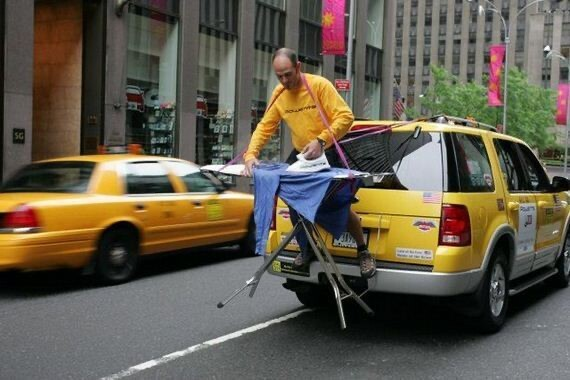
基础离线引擎 API 调用#
[3]:
from sglang import Engine


llm = Engine(model_path=model_path, chat_template=chat_template, log_level="warning")
[2025-12-30 02:20:51] INFO utils.py:148: Note: detected 112 virtual cores but NumExpr set to maximum of 64, check "NUMEXPR_MAX_THREADS" environment variable.
[2025-12-30 02:20:51] INFO utils.py:151: Note: NumExpr detected 112 cores but "NUMEXPR_MAX_THREADS" not set, so enforcing safe limit of 16.
[2025-12-30 02:20:51] INFO utils.py:164: NumExpr defaulting to 16 threads.
[2025-12-30 02:20:53] INFO server_args.py:1564: Attention backend not specified. Use flashinfer backend by default.
[2025-12-30 02:20:53] INFO server_args.py:2442: Set soft_watchdog_timeout since in CI
[2025-12-30 02:20:53] INFO engine.py:153: server_args=ServerArgs(model_path='Qwen/Qwen2.5-VL-3B-Instruct', tokenizer_path='Qwen/Qwen2.5-VL-3B-Instruct', tokenizer_mode='auto', tokenizer_worker_num=1, skip_tokenizer_init=False, load_format='auto', model_loader_extra_config='{}', trust_remote_code=False, context_length=None, is_embedding=False, enable_multimodal=None, revision=None, model_impl='auto', host='127.0.0.1', port=30000, fastapi_root_path='', grpc_mode=False, skip_server_warmup=False, warmups=None, nccl_port=None, checkpoint_engine_wait_weights_before_ready=False, dtype='auto', quantization=None, quantization_param_path=None, kv_cache_dtype='auto', enable_fp32_lm_head=False, modelopt_quant=None, modelopt_checkpoint_restore_path=None, modelopt_checkpoint_save_path=None, modelopt_export_path=None, quantize_and_serve=False, rl_quant_profile=None, mem_fraction_static=0.7486296874999999, max_running_requests=None, max_queued_requests=None, max_total_tokens=None, chunked_prefill_size=8192, enable_dynamic_chunking=False, max_prefill_tokens=16384, prefill_max_requests=None, schedule_policy='fcfs', enable_priority_scheduling=False, abort_on_priority_when_disabled=False, schedule_low_priority_values_first=False, priority_scheduling_preemption_threshold=10, schedule_conservativeness=1.0, page_size=1, hybrid_kvcache_ratio=None, swa_full_tokens_ratio=0.8, disable_hybrid_swa_memory=False, radix_eviction_policy='lru', device='cuda', tp_size=1, pp_size=1, pp_max_micro_batch_size=None, pp_async_batch_depth=0, stream_interval=1, stream_output=False, random_seed=129017831, constrained_json_whitespace_pattern=None, constrained_json_disable_any_whitespace=False, watchdog_timeout=300, soft_watchdog_timeout=300, dist_timeout=None, download_dir=None, base_gpu_id=0, gpu_id_step=1, sleep_on_idle=False, custom_sigquit_handler=None, log_level='warning', log_level_http=None, log_requests=False, log_requests_level=2, log_requests_format='text', crash_dump_folder=None, show_time_cost=False, enable_metrics=False, enable_metrics_for_all_schedulers=False, tokenizer_metrics_custom_labels_header='x-custom-labels', tokenizer_metrics_allowed_custom_labels=None, bucket_time_to_first_token=None, bucket_inter_token_latency=None, bucket_e2e_request_latency=None, collect_tokens_histogram=False, prompt_tokens_buckets=None, generation_tokens_buckets=None, gc_warning_threshold_secs=0.0, decode_log_interval=40, enable_request_time_stats_logging=False, kv_events_config=None, enable_trace=False, otlp_traces_endpoint='localhost:4317', export_metrics_to_file=False, export_metrics_to_file_dir=None, api_key=None, served_model_name='Qwen/Qwen2.5-VL-3B-Instruct', weight_version='default', chat_template='qwen2-vl', completion_template=None, file_storage_path='sglang_storage', enable_cache_report=False, reasoning_parser=None, tool_call_parser=None, tool_server=None, sampling_defaults='model', dp_size=1, load_balance_method='round_robin', prefill_round_robin_balance=False, dist_init_addr=None, nnodes=1, node_rank=0, json_model_override_args='{}', preferred_sampling_params=None, enable_lora=None, max_lora_rank=None, lora_target_modules=None, lora_paths=None, max_loaded_loras=None, max_loras_per_batch=8, lora_eviction_policy='lru', lora_backend='csgmv', max_lora_chunk_size=16, attention_backend='flashinfer', decode_attention_backend=None, prefill_attention_backend=None, sampling_backend='flashinfer', grammar_backend='xgrammar', mm_attention_backend=None, fp8_gemm_runner_backend='auto', nsa_prefill_backend='flashmla_sparse', nsa_decode_backend='fa3', disable_flashinfer_autotune=False, speculative_algorithm=None, speculative_draft_model_path=None, speculative_draft_model_revision=None, speculative_draft_load_format=None, speculative_num_steps=None, speculative_eagle_topk=None, speculative_num_draft_tokens=None, speculative_accept_threshold_single=1.0, speculative_accept_threshold_acc=1.0, speculative_token_map=None, speculative_attention_mode='prefill', speculative_draft_attention_backend=None, speculative_moe_runner_backend='auto', speculative_moe_a2a_backend=None, speculative_draft_model_quantization=None, speculative_ngram_min_match_window_size=1, speculative_ngram_max_match_window_size=12, speculative_ngram_min_bfs_breadth=1, speculative_ngram_max_bfs_breadth=10, speculative_ngram_match_type='BFS', speculative_ngram_branch_length=18, speculative_ngram_capacity=10000000, enable_multi_layer_eagle=False, ep_size=1, moe_a2a_backend='none', moe_runner_backend='auto', flashinfer_mxfp4_moe_precision='default', enable_flashinfer_allreduce_fusion=False, deepep_mode='auto', ep_num_redundant_experts=0, ep_dispatch_algorithm=None, init_expert_location='trivial', enable_eplb=False, eplb_algorithm='auto', eplb_rebalance_num_iterations=1000, eplb_rebalance_layers_per_chunk=None, eplb_min_rebalancing_utilization_threshold=1.0, expert_distribution_recorder_mode=None, expert_distribution_recorder_buffer_size=1000, enable_expert_distribution_metrics=False, deepep_config=None, moe_dense_tp_size=None, elastic_ep_backend=None, mooncake_ib_device=None, max_mamba_cache_size=None, mamba_ssm_dtype='float32', mamba_full_memory_ratio=0.9, mamba_scheduler_strategy='no_buffer', mamba_track_interval=256, enable_hierarchical_cache=False, hicache_ratio=2.0, hicache_size=0, hicache_write_policy='write_through', hicache_io_backend='kernel', hicache_mem_layout='layer_first', hicache_storage_backend=None, hicache_storage_prefetch_policy='best_effort', hicache_storage_backend_extra_config=None, enable_lmcache=False, kt_weight_path=None, kt_method=None, kt_cpuinfer=None, kt_threadpool_count=None, kt_num_gpu_experts=None, kt_max_deferred_experts_per_token=None, dllm_algorithm=None, dllm_algorithm_config=None, enable_double_sparsity=False, ds_channel_config_path=None, ds_heavy_channel_num=32, ds_heavy_token_num=256, ds_heavy_channel_type='qk', ds_sparse_decode_threshold=4096, cpu_offload_gb=0, offload_group_size=-1, offload_num_in_group=1, offload_prefetch_step=1, offload_mode='cpu', multi_item_scoring_delimiter=None, disable_radix_cache=False, cuda_graph_max_bs=256, cuda_graph_bs=[1, 2, 4, 8, 12, 16, 24, 32, 40, 48, 56, 64, 72, 80, 88, 96, 104, 112, 120, 128, 136, 144, 152, 160, 168, 176, 184, 192, 200, 208, 216, 224, 232, 240, 248, 256], disable_cuda_graph=False, disable_cuda_graph_padding=False, enable_profile_cuda_graph=False, enable_cudagraph_gc=False, enable_layerwise_nvtx_marker=False, enable_nccl_nvls=False, enable_symm_mem=False, disable_flashinfer_cutlass_moe_fp4_allgather=False, enable_tokenizer_batch_encode=False, disable_tokenizer_batch_decode=False, disable_outlines_disk_cache=False, disable_custom_all_reduce=False, enable_mscclpp=False, enable_torch_symm_mem=False, disable_overlap_schedule=False, enable_mixed_chunk=False, enable_dp_attention=False, enable_dp_lm_head=False, enable_two_batch_overlap=False, enable_single_batch_overlap=False, tbo_token_distribution_threshold=0.48, enable_torch_compile=False, enable_piecewise_cuda_graph=False, enable_torch_compile_debug_mode=False, torch_compile_max_bs=32, piecewise_cuda_graph_max_tokens=8192, piecewise_cuda_graph_tokens=[4, 8, 12, 16, 20, 24, 28, 32, 48, 64, 80, 96, 112, 128, 144, 160, 176, 192, 208, 224, 240, 256, 288, 320, 352, 384, 416, 448, 480, 512, 640, 768, 896, 1024, 1152, 1280, 1408, 1536, 1664, 1792, 1920, 2048, 2176, 2304, 2432, 2560, 2688, 2816, 2944, 3072, 3200, 3328, 3456, 3584, 3712, 3840, 3968, 4096, 4352, 4608, 4864, 5120, 5376, 5632, 5888, 6144, 6400, 6656, 6912, 7168, 7424, 7680, 7936, 8192], piecewise_cuda_graph_compiler='eager', torchao_config='', enable_nan_detection=False, enable_p2p_check=False, triton_attention_reduce_in_fp32=False, triton_attention_num_kv_splits=8, triton_attention_split_tile_size=None, num_continuous_decode_steps=1, delete_ckpt_after_loading=False, enable_memory_saver=False, enable_weights_cpu_backup=False, enable_draft_weights_cpu_backup=False, allow_auto_truncate=False, enable_custom_logit_processor=False, flashinfer_mla_disable_ragged=False, disable_shared_experts_fusion=False, disable_chunked_prefix_cache=False, disable_fast_image_processor=False, keep_mm_feature_on_device=False, enable_return_hidden_states=False, enable_return_routed_experts=False, scheduler_recv_interval=1, numa_node=None, enable_deterministic_inference=False, rl_on_policy_target=None, enable_attn_tp_input_scattered=False, enable_nsa_prefill_context_parallel=False, enable_fused_qk_norm_rope=False, enable_dynamic_batch_tokenizer=False, dynamic_batch_tokenizer_batch_size=32, dynamic_batch_tokenizer_batch_timeout=0.002, debug_tensor_dump_output_folder=None, debug_tensor_dump_layers=None, debug_tensor_dump_input_file=None, debug_tensor_dump_inject=False, disaggregation_mode='null', disaggregation_transfer_backend='mooncake', disaggregation_bootstrap_port=8998, disaggregation_decode_tp=None, disaggregation_decode_dp=None, disaggregation_prefill_pp=1, disaggregation_ib_device=None, disaggregation_decode_enable_offload_kvcache=False, disaggregation_decode_enable_fake_auto=False, num_reserved_decode_tokens=512, disaggregation_decode_polling_interval=1, encoder_only=False, language_only=False, encoder_transfer_backend='zmq_to_scheduler', encoder_urls=[], custom_weight_loader=[], weight_loader_disable_mmap=False, remote_instance_weight_loader_seed_instance_ip=None, remote_instance_weight_loader_seed_instance_service_port=None, remote_instance_weight_loader_send_weights_group_ports=None, remote_instance_weight_loader_backend='nccl', remote_instance_weight_loader_start_seed_via_transfer_engine=False, enable_pdmux=False, pdmux_config_path=None, sm_group_num=8, mm_max_concurrent_calls=32, mm_per_request_timeout=10.0, enable_broadcast_mm_inputs_process=False, enable_prefix_mm_cache=False, mm_enable_dp_encoder=False, mm_process_config={}, limit_mm_data_per_request=None, decrypted_config_file=None, decrypted_draft_config_file=None, forward_hooks=None)
[2025-12-30 02:20:56] Ignore import error when loading sglang.srt.multimodal.processors.glmasr: cannot import name 'GlmAsrConfig' from 'transformers' (/usr/local/lib/python3.10/dist-packages/transformers/__init__.py)
[Gloo] Rank 0 is connected to 0 peer ranks. Expected number of connected peer ranks is : 0
[Gloo] Rank 0 is connected to 0 peer ranks. Expected number of connected peer ranks is : 0
[Gloo] Rank 0 is connected to 0 peer ranks. Expected number of connected peer ranks is : 0
[Gloo] Rank 0 is connected to 0 peer ranks. Expected number of connected peer ranks is : 0
[2025-12-30 02:21:05] Ignore import error when loading sglang.srt.models.glmasr: cannot import name 'GlmAsrConfig' from 'transformers' (/usr/local/lib/python3.10/dist-packages/transformers/__init__.py)
Loading safetensors checkpoint shards:   0% Completed | 0/2 [00:00<?, ?it/s]
Loading safetensors checkpoint shards:  50% Completed | 1/2 [00:00<00:00,  1.13it/s]
Loading safetensors checkpoint shards: 100% Completed | 2/2 [00:01<00:00,  1.22it/s]
Loading safetensors checkpoint shards: 100% Completed | 2/2 [00:01<00:00,  1.20it/s]

Capturing batches (bs=1 avail_mem=10.46 GB): 100%|██████████| 36/36 [00:03<00:00, 10.59it/s]
[4]:
out = llm.generate(prompt=conv.get_prompt(), image_data=[image])
print("Model response:")
print(out["text"])
Model response:
The picture shows two yellow taxis on a city street, with one appearing to be a "smoke machine." A man wearing a yellow shirt and blue jeans is driving one of the taxis, and he is using a device that emits a cloud of smoke to create the illusion of a smoking taxi.
使用处理器输出进行调用#
使用 HuggingFace 处理器预处理文本和图像,并将 processor_output 直接传递给 Engine.generate。
[5]:
from transformers import AutoProcessor

processor = AutoProcessor.from_pretrained(model_path, use_fast=True)
processor_output = processor(
    images=[image], text=conv.get_prompt(), return_tensors="pt"
)

out = llm.generate(
    input_ids=processor_output["input_ids"][0].detach().cpu().tolist(),
    image_data=[dict(processor_output, format="processor_output")],
)
print("Response using processor output:")
print(out["text"])
Response using processor output:
The image shows a street scene with two taxi cabs. One taxi cab is yellow and has a person hanging clothes on it, while the other is yellow as well. The person is using a makeshift clothesline attached to the dents in the taxi's body. This is an interesting and unusual sight, with the cab serving as a temporary clothes drying rack.
使用预计算嵌入进行调用#
您可以预先计算图像特征,以避免重复的视觉编码过程。
[6]:
from transformers import AutoProcessor
from transformers import Qwen2_5_VLForConditionalGeneration

processor = AutoProcessor.from_pretrained(model_path, use_fast=True)
vision = (
    Qwen2_5_VLForConditionalGeneration.from_pretrained(model_path).eval().visual.cuda()
)
[7]:
processor_output = processor(
    images=[image], text=conv.get_prompt(), return_tensors="pt"
)

input_ids = processor_output["input_ids"][0].detach().cpu().tolist()

precomputed_embeddings = vision(
    processor_output["pixel_values"].cuda(), processor_output["image_grid_thw"].cuda()
)

multi_modal_item = dict(
    processor_output,
    format="precomputed_embedding",
    feature=precomputed_embeddings,
)

out = llm.generate(input_ids=input_ids, image_data=[multi_modal_item])
print("Response using precomputed embeddings:")
print(out["text"])

llm.shutdown()
Response using precomputed embeddings:
The image shows a yellow taxi cab in the middle of a street with a blue tarp or cloth draped over its rear. The taxi is parked perpendicular to the curb, and it appears to be in the process of being cleaned with a hose attached to a sprayer. This method is sometimes used to rinse off heavy grime or to remove stains from a vehicle.
查询 Llama 4 视觉模型#
model_path = "meta-llama/Llama-4-Scout-17B-16E-Instruct"
chat_template = "llama-4"

from io import BytesIO
import requests
from PIL import Image

from sglang.srt.parser.conversation import chat_templates

# Download the same example image
image = Image.open(
    BytesIO(
        requests.get(
            "https://github.com/sgl-project/sglang/blob/main/examples/assets/example_image.png?raw=true"
        ).content
    )
)

conv = chat_templates[chat_template].copy()
conv.append_message(conv.roles[0], f"What's shown here: {conv.image_token}?")
conv.append_message(conv.roles[1], "")
conv.image_data = [image]

print("Llama 4 generated prompt text:")
print(conv.get_prompt())
print(f"Image size: {image.size}")

image
Llama 4 基础调用#
Llama 4 需要更多的计算资源,因此配置了多 GPU 并行 (tp_size=4) 和更长的上下文长度。
llm = Engine(
    model_path=model_path,
    enable_multimodal=True,
    attention_backend="fa3",
    tp_size=4,
    context_length=65536,
)

out = llm.generate(prompt=conv.get_prompt(), image_data=[image])
print("Llama 4 response:")
print(out["text"])
使用处理器输出进行调用#
使用 HuggingFace 处理器预处理数据可以减少推理期间的计算开销。
from transformers import AutoProcessor

processor = AutoProcessor.from_pretrained(model_path, use_fast=True)
processor_output = processor(
    images=[image], text=conv.get_prompt(), return_tensors="pt"
)

out = llm.generate(
    input_ids=processor_output["input_ids"][0].detach().cpu().tolist(),
    image_data=[dict(processor_output, format="processor_output")],
)
print("Response using processor output:")
print(out)
使用预计算嵌入进行调用#
from transformers import AutoProcessor
from transformers import Llama4ForConditionalGeneration

processor = AutoProcessor.from_pretrained(model_path, use_fast=True)
model = Llama4ForConditionalGeneration.from_pretrained(
    model_path, torch_dtype="auto"
).eval()

vision = model.vision_model.cuda()
multi_modal_projector = model.multi_modal_projector.cuda()

print(f'Image pixel values shape: {processor_output["pixel_values"].shape}')
input_ids = processor_output["input_ids"][0].detach().cpu().tolist()

# Process image through vision encoder
image_outputs = vision(
    processor_output["pixel_values"].to("cuda"),
    aspect_ratio_ids=processor_output["aspect_ratio_ids"].to("cuda"),
    aspect_ratio_mask=processor_output["aspect_ratio_mask"].to("cuda"),
    output_hidden_states=False
)
image_features = image_outputs.last_hidden_state

# Flatten image features and pass through multimodal projector
vision_flat = image_features.view(-1, image_features.size(-1))
precomputed_embeddings = multi_modal_projector(vision_flat)

# Build precomputed embedding data item
mm_item = dict(
    processor_output,
    format="precomputed_embedding",
    feature=precomputed_embeddings
)

# Use precomputed embeddings for efficient inference
out = llm.generate(input_ids=input_ids, image_data=[mm_item])
print("Llama 4 precomputed embedding response:")
print(out["text"])